


GET Mobile: ID Card Management
4.4731.00 Reviews
App Specs
- Version
- 5.0.51
- Updated On
- License
- Free
- Downloads
- 500,000+
- Developer
- The CBORD Group, Inc.
- Categories
- Finance
- Platform
- Android
Screenshots
 Analysis by AppCompare
I found GET Mobile: ID Card Management most useful when I stopped thinking of it as a general wallet and treated it as a digital doorway to a specific university or hospital account. The app is designed to put an institution-issued ID on a phone, so its value depends heavily on whether the school or medical organization you use supports the GET system. When that connection is in place, it can remove one small but surprisingly annoying task from daily life: remembering to carry a physical identification card.
That makes it a particularly interesting app for shared-device households. A parent may help a student get set up, a household may share a tablet for account administration, or someone may need to coordinate access to a campus or hospital service without confusing one person’s identity with another’s. In my experience, the main question is not whether the app looks impressive. It is whether it fits the boundaries of your institution, your phone habits, and the person whose ID is being managed.
What using GET Mobile feels like in everyday life
The most realistic scenario is simple. Imagine leaving home for class or a hospital shift and realizing your physical card is still on the desk. If your supported ID is already available in GET Mobile, the phone becomes the item you are more likely to have with you. That can make routine access less dependent on a plastic card, although I would still treat the physical card as a sensible backup whenever the institution expects one.
I also see a practical role for the app when a household is coordinating responsibilities. A parent might help a new student understand where the institutional ID belongs on the phone, while the student remains the person responsible for using that identity. Similarly, a family member helping someone who works or studies in a hospital environment can assist with the initial process without assuming that the digital ID should be shared between people.
That distinction matters. GET Mobile is not a household wallet in which several people should casually use one profile. It is better understood as an identity tool tied to the person and organization it serves. The app can make coordination easier, but it does not turn one person’s institutional credentials into a family resource.
The developer behind it is The CBORD Group, Inc., and the app belongs to the finance category. That classification makes sense because an institutional ID can be connected to the broader financial and access routines of campus or hospital life, even though the central experience is identification rather than personal banking. I would not install it expecting a replacement for a bank app, a broad mobile wallet, or a universal student-services hub.
Starting with the right account boundary
The first useful rule is to decide whose ID is being placed on the phone before doing anything else. On a shared family device, this is especially important. If a parent’s account is open while helping a student, it is easy to complete setup under the wrong identity or leave the wrong person’s information available for the next user. I recommend treating the phone as belonging to one primary ID holder during the setup process, even if another person is providing technical help.
Worth Reading Before You Choose

EA SPORTS FC Mobile 26 Is a Bigger Football Game, but It Takes Time

Flipboard Shows What News Apps Must Do Beyond the Feed

Switching to Android Auto Means Rethinking Your Driving Routine

Google Calendar Makes a Crowded Week Easier to Manage

Ludo King Makes the Most of the Minutes Between Plans

Baby Panda World Brings Quick Play to Modern Phones, but Its Game Library Feels Busy
This is also where the app’s limits become clear. GET Mobile cannot be judged independently from the university or hospital that supports it. The institution controls the relationship behind the ID, while the app provides the mobile layer. If your organization does not use the relevant GET service, downloading the app alone will not create an institutional credential for you.
For a student moving between home and campus, I would complete the setup privately, check that the correct identity appears, and then close the app before handing the phone to someone else. That is not a complicated workflow, but it prevents a common shared-device mistake: assuming that helping with access means everyone in the household should know or use the same account.
The app is free, which removes one barrier to trying it. Still, “free” does not mean it replaces every physical or institutional requirement. Your organization may continue to expect a physical card in certain situations, and a phone can be unavailable because of a dead battery, damage, loss, or a technical problem. I see the digital ID as a convenience and an additional access route, not as a reason to discard every backup.
Coordinating access without mixing identities
GET Mobile works best when coordination is about preparation rather than shared use. A household can agree on who will install it, who will help with the first sign-in, and what to do if the phone is lost. Those conversations are more useful than passing the phone around and leaving the app open. The ID belongs to its holder, so the practical goal is to make that person independent after setup.
For a student, that might mean a parent helps confirm the correct institution and then lets the student take over. For a hospital employee, it might mean a trusted family member helps with phone settings while the employee checks the displayed identity themselves. In both cases, I would avoid screenshots or copied images of the ID as substitutes. A static image may not behave like the app, and it creates a second copy of sensitive identification that can be difficult to control.
One useful household habit is to separate technical support from account access. Someone can explain how to open the app without needing to handle the account every time. This is a small distinction, but it reduces confusion when several people share chargers, tablets, or phones. It also makes it easier to identify which person should contact the institution if the ID stops working.
I would also keep the app’s role clear during travel between locations. If a student studies at one institution and a parent works at another, the presence of GET Mobile on the phone does not mean both identities should be combined. The safest workflow is one supported identity per person and careful attention to which organization issued it. When the wrong account is visible, the problem is not merely cosmetic; it can affect access and trust.
Compared with carrying a physical card, the app is more convenient when the phone is already in hand. Compared with a general-purpose mobile wallet, it is narrower but potentially more relevant to the institution that supports it. A bank app manages money, a phone wallet usually gathers payment or loyalty credentials, and GET Mobile focuses on the institutional ID experience. I prefer that focused approach when I need the campus or hospital credential, but I would not use it as a substitute for those other tools.
Age, trust, and the person holding the phone
The content rating is Everyone, so the app is positioned for a broad audience rather than a restricted adult-only use case. That does not remove the need for age-appropriate guidance. A younger student may need help understanding that an ID app is personal, while an older student may reasonably want to manage it without a parent seeing every account detail. The right level of involvement depends on maturity, institutional rules, and the trust already present at home.
For families, I think the best approach is transparent assistance. Explain what the app is for, help the ID holder verify the account, and agree on what happens if the phone is lost. Avoid treating a young person’s institutional identity as something every family member can inspect whenever they want. Support should make the student safer and more capable, not quietly erase the boundary between household help and personal credentials.
The same principle applies to adults receiving assistance. An older worker or student may ask a relative to help with installation, but that does not automatically make the relative an authorized user. GET Mobile is a poor fit for a household that wants one shared identity or a single screen for everyone’s campus and hospital access. Its usefulness comes from matching the mobile ID to the correct person, not from making identity interchangeable.
Trust also affects the decision to rely on the app during important routines. If you are uncomfortable carrying an institutional ID on a phone that other people regularly borrow, a physical card may remain the better primary option. If the phone is personal and normally stays with you, the digital approach becomes more attractive. That is a meaningful trade-off: convenience rises when the phone is always available, but privacy and access depend more closely on how that device is handled.
I would be careful with shared tablets in particular. A tablet can be helpful during setup or account guidance, but it is not automatically the best long-term home for an ID intended for use away from home. A student may forget which device contains the credential, while another household member may open the app accidentally. Keeping the active ID on the holder’s everyday phone creates a clearer boundary and a more predictable routine.
Practical limitations I noticed in the concept
The biggest limitation is dependence on institutional support. GET Mobile is not a universal ID manager that can import any school or hospital card. Before building your daily routine around it, confirm that your organization uses the service and that your account is eligible. This is the first check I would make, because no amount of phone troubleshooting can solve a mismatch between the app and the issuing institution.
The second limitation is that a digital ID inherits the weaknesses of the phone. A forgotten device, low battery, damaged screen, or lost handset can turn a convenient credential into an unavailable one. That does not make the app a bad choice, but it changes how I would use it. For important travel, work, or campus routines, I would know the institution’s fallback process and keep the physical card available when practical.
There is also a psychological friction that does not appear in a short store summary. People are used to handing over a physical card, while a phone can feel more personal and more complicated to present. In a busy queue, unlocking the right device and opening the right app may be less effortless than reaching for plastic. The app is strongest when it saves you from carrying another item, not when you expect it to eliminate every step in an access interaction.
Version 5.0.51 is the current version, and the app requires an operating system version of 10 or newer. That requirement is worth checking before planning to use an older phone, especially in a household where devices are passed down. A family may have a perfectly usable handset for calls and messaging that still cannot serve as the home for this app. In that situation, the practical answer may be updating the device, using a newer personal phone, or staying with the physical ID.
The app has been available since November 19, 2014, and its longevity suggests that this is an established product rather than a newly launched experiment. Its current reach is over 500 thousand installs, with an average rating of 4.4 from around 4.3 thousand ratings. Those figures make it easier for me to view the app as a mature utility, but they do not guarantee that every university or hospital implementation will feel identical. The organization connected to the app still shapes the real experience.
Who should use it and who should skip it
I would recommend GET Mobile to a student or hospital worker whose organization supports it and who already relies heavily on a phone. It is also a sensible option for someone who frequently forgets a physical card but rarely forgets their handset. The free price makes experimentation straightforward, and the Everyone rating means it can fit a wide range of users when handled with sensible account boundaries.
I would be more cautious if your phone is shared daily, often left at home, or regularly runs out of power. The app may still help during setup or occasional use, but it should not become your only plan. I would also skip it as a general wallet replacement. If your main need is banking, payments, loyalty cards, or managing several unrelated identities, a dedicated tool for that purpose will be clearer and more capable.
For households, the strongest use case is guided independence: one person helps the ID holder install and understand the app, then the holder manages the credential personally. The weakest use case is collective access, where several people expect to open one profile or use one digital ID. That arrangement creates confusion about whose identity is active and makes the app less trustworthy as an access tool.
My practical setup advice is to verify the institution first, use the correct person’s account, check the displayed identity before relying on it, and decide on a backup before leaving home. I would also avoid storing casual screenshots of the ID and would not leave the app open on a shared device. These steps are simple, but they address the real risks more effectively than treating the app like an ordinary finance download.
My household verdict
After looking at GET Mobile through the lens of shared devices and family coordination, I see it as a focused convenience rather than a complete identity solution. Its real strength is putting the right institutional ID with the right person at the moment it is needed. That is valuable for supported university and hospital users, especially when the phone is more reliable than a wallet full of cards.
I like the app when account boundaries are clear. A parent can help a student, a relative can provide technical support, and a household can agree on a backup plan without turning one person’s credential into shared property. That balance makes the app more useful and more respectful of personal trust.
My reservations are equally clear: institutional compatibility comes first, the phone remains a point of failure, and an older or shared device may not be suitable. The app is free and widely installed, but those advantages do not remove the need to check the operating-system requirement or understand how your organization handles physical and digital IDs.
Overall, I would recommend it to the specific people it is built for, not to everyone looking for a generic mobile wallet. If your university or hospital supports GET and your phone is personal, current, and usually with you, GET Mobile can make everyday identification noticeably easier. If your household needs one shared account, or if you need broad payment and credential management, I would choose a different solution and keep this app limited to the institutional ID holder.
Pros
- Keeps essential ID details accessible from a smartphone.
- Reduces the need to carry physical identification cards.
- Can make updating personal information more convenient.
- Useful for organizations managing digital identity credentials.
- A digital backup may help when physical documents are unavailable.
Cons
- Availability may depend on participating institutions or regions.
- Phone loss or damage can temporarily limit access to your ID.
- Requires strong device security to protect sensitive information.
- Some services may still require a physical card or document.
- Compatibility with older phones may be limited.
FAQs for GET Mobile: ID Card Management
What is GET Mobile: ID Card Management used for?
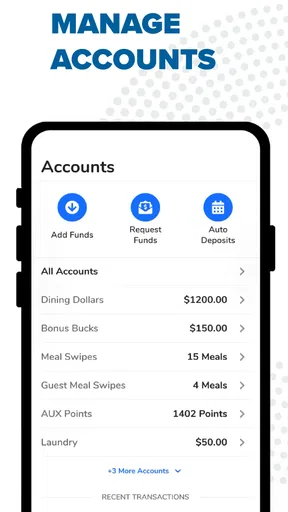
GET Mobile: ID Card Management is designed to help users access and manage digital identification information from a mobile device. Depending on the organization or service that issued your card, the app may let you view your ID details, present identification when required, and keep related information available in one place. Its exact functions can vary by institution and supported region.
Is GET Mobile: ID Card Management an official replacement for a physical ID card?
You should not assume that the digital card automatically replaces your physical identification everywhere. Acceptance depends on the issuing organization, local regulations, and the specific service requesting your ID. Before relying on the app for travel, official appointments, age verification, or access control, confirm that digital identification is accepted and keep your physical card available when required.
What information or permissions does the app require?
During setup, GET Mobile: ID Card Management may request personal identification details, account credentials, camera access for scanning documents or codes, and notification permissions. These requirements can differ according to the card issuer and the features enabled for your account. Review the privacy policy and Android or iOS permission prompts carefully, granting only access that is necessary for the service.
How do I set up and access my digital ID in GET Mobile?
Typically, you need to download the app from the official store, create or sign in to an account, and follow the verification process provided by the issuing organization. This may include entering information from your physical card, confirming your identity, or scanning a QR code. Make sure your details match official records, use a secure connection, and complete any required verification steps.
What should I do if I lose my phone or cannot access the app?
If your phone is lost, stolen, replaced, or unable to connect, contact the organization that issued your digital ID as soon as possible. Ask whether your account or mobile credential can be suspended and how it can be restored on another device. Protect the account with a strong password, device lock, and available security features, and do not share verification codes with anyone.


